
目录
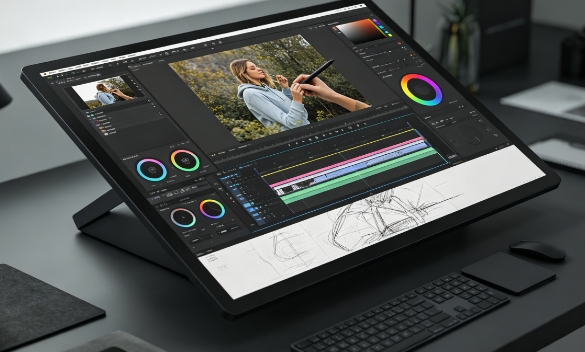
In today’s digital creative industry, professionals rely heavily on advanced tools to improve productivity, precision, and artistic flexibility. Among the most discussed technologies is the Touch Display, which combines visual output with direct interactive control. Unlike traditional monitors, this type of device allows creators to draw, edit, zoom, and manipulate content directly on the screen using fingers or a stylus. As industries such as graphic design, animation, photography, and video production continue to evolve, many professionals are considering whether a Touch Display is truly suitable for high-level creative work. The answer depends on workflow demands, software compatibility, and the level of precision required in professional environments.
Improved Creative Precision and Natural Workflow
One of the biggest reasons professionals adopt a Touch Display is the level of precision and control it offers during creative tasks.
- Direct on-screen interaction: Artists and designers can work directly on visuals instead of controlling a separate cursor, creating a more natural editing experience.
- Stylus accuracy for detailed work: Advanced pen technology supports pressure sensitivity and tilt recognition, which is essential for illustration, photo retouching, and digital painting.
- More realistic drawing experience: The feeling of drawing directly on the screen closely resembles traditional sketching methods, improving creative flow.
- Efficient adjustment of visual elements: Designers can quickly resize, rotate, and edit objects using touch gestures without interrupting concentration.
These capabilities make the Touch Display highly effective for professionals who require detailed and visually accurate work.
Productivity Advantages in Professional Environments
A Touch Display can also improve workflow efficiency by simplifying many repetitive editing and navigation tasks.
- Faster content manipulation: Users can interact directly with layers, timelines, and objects, reducing unnecessary steps during editing.
- Improved multitasking capabilities: Creative professionals often work with multiple windows, references, and tools simultaneously, and touch navigation makes switching between them easier.
- Enhanced Collaboration During Presentations: Teams can directly annotate, explain, or adjust designs on the screen during meetings or client reviews.
- Reduced workflow interruptions: Instead of constantly changing between input devices, many actions can be completed on-screen, helping maintain focus.
These advantages help professionals save time and improve overall productivity during complex projects.
Essential Features for Professional Use
Not every Touch Display is suitable for demanding creative workloads, so professionals must evaluate technical features carefully.
- High color accuracy: Professional work requires accurate color representation, especially for photography, branding, and print design.
- High-resolution screens: Sharp resolutions such as 2K or 4K ensure detailed image editing and precise visual adjustments.
- Low latency response: Minimal delay between stylus movement and screen response is critical for smooth drawing and editing experiences.
- Reliable build quality: Stable stands, durable surfaces, and ergonomic designs improve comfort during long creative sessions.
Choosing the right specifications ensures that the device can handle professional-level creative requirements effectively.
Limitations and Challenges in Creative Workflows
Despite the numerous advantages of touchscreen displays, they also present certain limitations that professionals should consider before integrating them into their workflows.
- Higher equipment costs: Professional-grade models with advanced stylus support and accurate color calibration are often expensive.
- Software optimization differences: While many creative applications support touch functionality, some advanced features still work better with keyboard shortcuts and mouse input.
- Potential physical fatigue: Long hours of touch interaction on vertical screens can lead to arm or wrist strain if ergonomics are not properly managed.
- Learning adaptation period: Professionals accustomed to traditional workflows may initially experience slower productivity when transitioning to touch-based interaction.
These challenges do not eliminate its value, but they highlight the importance of balancing touch functionality with traditional tools.
Industries That Benefit Most from Touch Technology
The suitability of a Touch Display depends greatly on the type of creative work being performed.
- Photo editing and retouching: Precise touch control improves masking, detail correction, and brush-based adjustments.
- Animation and motion graphics: Touch navigation simplifies timeline control and object movement.
- Architecture and product design: Interactive manipulation of models and layouts supports faster revisions and presentations.
In these industries, the Touch Display becomes more than a convenience—it becomes an important productivity and creativity tool.
Conclusion
In conclusion, a Touch Display is highly suitable for professional creative work when paired with the right software, workflow, and technical specifications. It enhances creativity through natural interaction, improves efficiency with direct control, and provides the precision needed for advanced visual tasks. However, it also presents limitations in terms of ergonomics, software compatibility, and cost, meaning that it may not be able to completely replace traditional configurations in all environments. For designers, illustrators, editors, and creative professionals seeking a more interactive workflow, a Touch Display can be a valuable long-term investment that supports both productivity and artistic expression.
0